

Streamlined Setup for Touch Accommodations in iOS and iPadOS
Apple has long been committed to making its devices accessible to everyone. One of the most useful accessibility features available on iPhone and iPad is Touch Accommodations. In recent versions of iOS and iPadOS, Apple has streamlined the setup process, making it easier for users to customize how their devices respond to touch input.
This enhancement helps people with motor skill challenges, hand tremors, limited dexterity, or other physical conditions interact more comfortably with their devices.
What Are Touch Accommodations?
Touch Accommodations is an accessibility feature that adjusts how the touchscreen responds to taps, swipes, and gestures. Instead of requiring precise touch interactions, users can customize touch sensitivity and timing to better suit their needs.
The feature is designed to reduce accidental touches and improve overall control when using an iPhone or iPad.
What Does Streamlined Setup Mean?
Streamlined Setup refers to Apple’s simplified configuration process for Touch Accommodations. Rather than navigating through multiple complicated settings, users can more easily find, enable, and customize touch controls.
The goal is to make accessibility features easier to understand and configure, even for users who may not be familiar with advanced settings.
How to Enable Touch Accommodations
Follow these steps to activate Touch Accommodations on your iPhone or iPad:
Step 1: Open Settings
Tap the Settings app on your device.
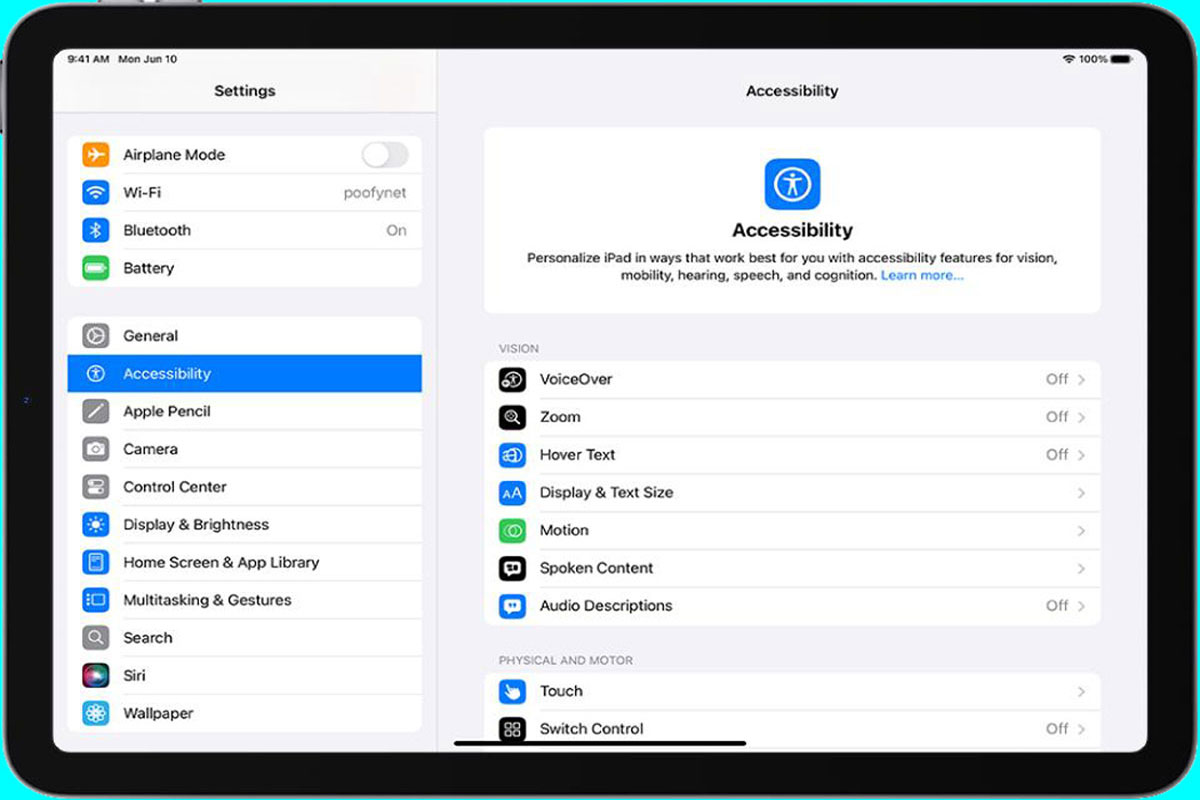
Step 2: Access Accessibility Settings
Scroll down and select:
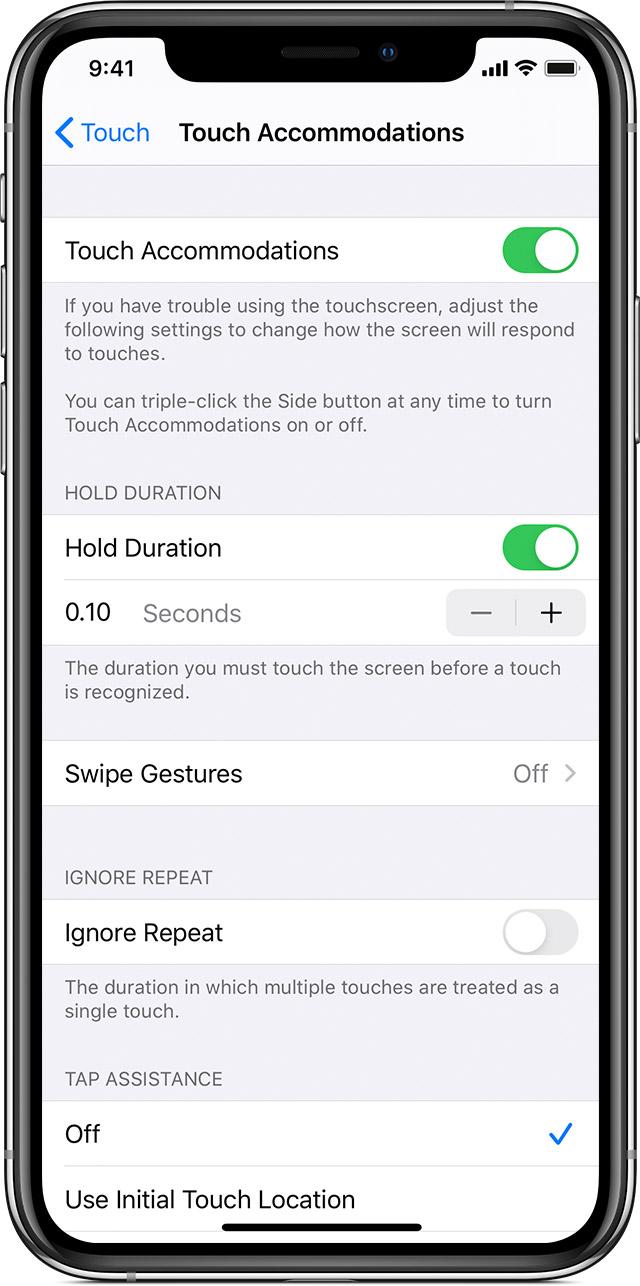
Accessibility → Touch → Touch Accommodations
Step 3: Turn On Touch Accommodations
Toggle the Touch Accommodations switch to enable the feature.
Once activated, additional customization options become available.
Key Touch Accommodation Features
1. Hold Duration
Hold Duration requires users to keep their finger on the screen for a specified amount of time before a touch is recognized.
Benefits
- Prevents accidental taps
- Improves touch accuracy
- Helps users with tremors.
2. Ignore Repeat
Ignore Repeat allows the device to recognize a single touch even if multiple rapid taps occur.
Benefits
- Reduces unintended repeated actions
- Improves navigation accuracy
- Makes app interaction more reliable
3. Tap Assistance
Tap Assistance determines how the device interprets touch gestures.
Users can configure whether the iPhone or iPad responds to the initial touch location or the final touch location.
Benefits
- Better gesture recognition
- Increased control over touchscreen interactions
- Improved usability for users with limited dexterity
Why Did Apple Streamline the Setup Process?
Apple’s goal is to make accessibility features more approachable and easier to configure.
1. Improved Accessibility
Tap Assistance determines how the device interprets touch gestures.
Users can configure whether the iPhone or iPad responds to the initial touch location or the final touch location.
Benefits
- Better gesture recognition
- Increased control over touchscreen interactions
- Improved usability for users with limited dexterity
1. Improved Accessibility
More users can quickly discover and activate helpful features.
2. Faster Setup
Users spend less time navigating menus and more time benefiting from customized controls.
3. Better User Experience
Simplified settings reduce confusion and help users find the right configuration more easily.
4. Greater Device Independence
People with physical challenges can use their devices more comfortably without requiring additional assistance.
Benefits for iPhone and iPad Users
The streamlined setup process provides several advantages:
- Easier accessibility customization
- Improved touch accuracy
- Fewer accidental taps
- Better support for motor impairments
- More comfortable device interaction
- Enhanced productivity and confidence
Concluding Remarks
The streamlined setup for Touch Accommodations in iOS and iPadOS reflects Apple’s ongoing commitment to accessibility and inclusive design. By simplifying the configuration process and providing powerful touch customization tools, Apple enables users of all abilities to interact with their devices more effectively. Whether you’re looking to reduce accidental touches or improve touchscreen accuracy, Touch Accommodations can significantly enhance the iPhone and iPad experience.